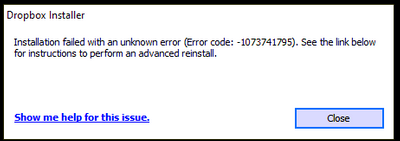
I keep getting the same error over and over again.
I have tried every suggested resolution and nothing has worked. Anyone?
Our engineers have put out a new Beta Build: 150.3.4929, which fixes the 'Installation failure: Error code 1073741795'. You can find details about the fix, and how to install it, here.
Its an older Intel I7 3770K
Intel I7 3770k
Hi @Nancy @Walter ,
Please post if this issue has been resolved. @Walter seemed to identify an issue for my situation (ARM processor), but before I purchase a different computer with a different processor, I need to know that there is a solution to the problem. The other threads seem to indicate that the error occurs on computers which do not have an ARM processor.
I have been a Dropbox Professional (paid subscription) for 10+ years and would like to continue using the program vs moving to another app.
So far, I have found three threads referencing the error code: 1073741795 and will be posting this comment on each.
It's crazy that this is not fixed already
As the original poster who started this thread on February 8th, I can share that this is not yet resolved and I'm currently being assisted by email. My desktop PC has an Intel i5-6500 processor and I'd been using the Dropbox desktop app without issue for at least 7 years if not longer, but was informed by app system tray notification that I had 21 days to update the app. That's when all this began.
I also looked through the other forum threads including one from another paid user account. As a paid user, I think you have access to direct support and can open a ticket. Good luck. I'm sure you'll get the help you need.
Hello,
I am trying to update Dropbox (as version 120 stopped working...) but I am getting the following error:
Installation failed with an unknown error (Error code: -1073741795).
I tried the advanced reinstall, deleted all Dropbox folders and registry keys, but nothing worked. I also tried with three different versions of the offline installer: 129.4.3571, 143.4.4161, 144.4.4491.
My PC meets the minimum requirements: Windows 10, Intel i5 Skylake, 8GB RAM.
Do you have any suggestions?
Thanks!
A day later and no one from drop box has gotten in touch to try and resolve the issue.
Thanks Nancy, here is my version and the exact error I get. I've tried turning off antivirus/firewall completely and same error.
Thanks!!
Mark
Windows 10 Enterprise ver 20H2
Build: 19042.1586
@nancy I get the exact same error as Mtesta. Windows 10 home build 10.0.19041
Add me to the list. Intel i5-9600K 6 core, 16GB ram, Win 10.0.19043 Pro build 19043. MSI motherboard with intel Z390 chipset.
I have dropbox on 7 other devices with no issue. Was working fine until update. Did advanced re-install. Did an uninstall as well. tried advanced re-install again. Nothing seems to work.
Hi @JenTo ,
Please accept my apologies if I "highjacked" your original thread. That was not my intent.🤗
My current (soon to be returned) new computer has a ARM processor, and that appears to be part of the issue, although your issue is important to me. I will be purchasing a different computer, with an i7 processor and do not want to encounter this issue without a resolution.
My previous computer was running Win7 (I know, I love legacy software), but the HD crashed in mid February. ">😫😭 I was never notified by Dropbox of the need for an "update" and did not have issues using the Desktop version on my Dell Lattitude with the i7 processor.
Hopefully when there is resolution for this error, it will posted here for all to see.
Hi @Sandman1001 ...
There are at least three threads in this forum regarding the error code 1073741795. I am attempting to check each thread with some regularity looking for a resolution.
So far, it appears that the error has not been resolved, or at least it has not been posted in any of the threads in this forum.
@Walter, @Nancy
Hey @MRBUSBY no worries. There are a number of users running into this error and hopefully whatever information we've provided Dropbox by email will help solve this issue. I still suggest that you contact support directly if it's a part of your paid subscription.
@JenTo
@Nancy @Walter
Yes, noted with thanks.
I did contact Support. Unfortunately, their response in the chat was to " ensure that SP1 for Win7 was downloaded " and that they could not help further with 3rd party apps or operating systems. The Galaxy Book running Win11 ( a replacement for my Win7 computer which failed) has an ARM processor which does not work with Dropbox Desktop.
@Walter helped in this forum by identifying the ARM processor.
I was hoping to see a resolution before I purchase a new computer with an i7 processor and running Win10 Pro or Win 11 Pro.
Unfortunately, Support won't help if there isn't a computer actively having a problem.
I will continue to watch for additional posts/updates and hopefully a resolution here.
Nancy requested information a few days ago and there has been no reply. I use this app daily and this delay is costing me time and energy. How can there not be a resolution to this. There have to be thousands of people who have the same issue. Can we PLEASE get a resolution???
I opened three different direct tickets by e-mail, each time I am contacted by e-mail, then I am referred to an expert, then I am offered to make very general corrections (disable the antivirus for example).
The latest build I manage to install is the 112https://www.dropboxforum.com/t5/Dropbox-desktop-client-builds/Beta-Build-112-3-254/td-p/476277
But when connecting, I am told to install the latest version.
with this softwarehttps://www.oo-software.com/fr/ooregeditorI looked for dropbox in the registar and I see that there are several hundred entries. maybe related to that.
I completely removed bitdefender, I only use windows security now. Even temporarily disabling it doesn't change anything.
I even opened a thread at microsoft but the proposed steps didn't change anything
https://answers.microsoft.com/en-us/windows/forum/windows_11-files/error-code-1073741795-while-installing-dropbox/d47fb5cc-92e3-4ba7-a14a-4f9fe2c2974b
in any case the error is not linked to the processor.
there are at least 5 different threads for this issue:
https://www.dropboxforum.com/t5/Dropbox-installs-integrations/Installation-Failed-Error-Code-1073741795/td-p/563661
https://www.dropboxforum.com/t5/Dropbox-installs-integrations/Cannot-install-Dropbox-Unknown-Error-Error-Code-1073741795/td-p/576345
https://www.dropboxforum.com/t5/Dropbox-installs-integrations/Cannot-install-Dropbox-with-Windows-11/td-p/583707
https://www.dropboxforum.com/t5/Dropbox-installs-integrations/Dropbox-Desktop-Cannot-Open-Uninstall-or-Re-Install/td-p/574199
https://www.dropboxforum.com/t5/Dropbox-installs-integrations/Cannot-installs-Dropbox-anymore/td-p/584686
other similar errors for other programs:https://www.researchgate.net/post/How_do_you_solve_the_system_error_code_1073741795_in_Abaqus_6142
https://support.corona-renderer.com/hc/en-us/articles/4402920593297-I-get-error-Error-code-1073741795-null-MSVCD100-dll-or-similar-error-message-
https://stackoverflow.com/questions/53057591/importerror-dll-load-failed-with-error-code-1073741795
Yes, but they have not contacted me yet. Its why I posted here.
EDIT: Scratch that, he just sent me a note.
What happened to the rest of this thread? I had been following/commenting on three threads with the error code 1073741795; this was one of the three. Now, none of my comments can be view as well as lot of comments by other community members/posters.
@Walter @Nancy @Megan
@Jay
Since two weeks I am in contact with the support, but the problem is still not solved.And there are many other users with exact the same problem.I use this app daily, so I am looking forward to a solution for this problem.
Likewise, I've been dealing with this error code for weeks now with no success. I've tried uninstalling dropbox completely, moving the dropbox files away from it's default location, safe mode install, disabling antivirus etc...
Every thread ends with "I'll email you directly" and never any actual resolution or solution posted on the forum.
The error still remains from my side!
This is creating major obstacles in my daily work
Thanks for your response. Yes, I have tried the advance re-install, many times. I have tried many suggestions from the community with the same result. Same message as my first screen shot. i hope your problem is solved here https://www.dropboxforum.com/t5/forums/replypage/board-id/101001007/message-id/118833.
Hi all,
I am also suffering from the this issue - both installers. It was not a serious problem until Dropbox (old version, which demands to update) now stops syncing because the version is out of date. This really is not o.k., many of the people who reported the bug warned for this issue in time and, like me, have a paid subscription but are not able to make use of Dropbox anymore.
I am running at:
Intel(R) Core(TM) i7-8700 CPU @ 3.20GHz 3.19 GHz
Also MSI motherboard with intel Z390 chipset.
Please Dropbox, this is a cry for help. This problem has become really urgent since sycing by old installations has been disabled.
Would it be an idea to ask the devteam to make a MSI install as temporary fix? This maybe also helps in debugging the issue. Or could you temporarily re-allow old installations to sync again?
kind regards,
Youri