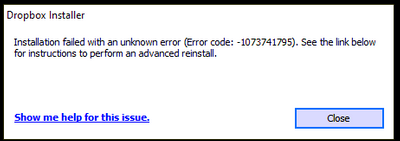
I keep getting the same error over and over again.
I have tried every suggested resolution and nothing has worked. Anyone?
Our engineers have put out a new Beta Build: 150.3.4929, which fixes the 'Installation failure: Error code 1073741795'. You can find details about the fix, and how to install it, here.
My problem is still the same.
Please let me know what to do.
@indraj436 does v.112.3.254 work for you?
I sent you an email follow up to your last reply, but it looks like that ticket was closed and no further reply can be made. Here is what I wrote:
@Walter
As a final note, I would just like to add that we have followed the advanced reinstall instructions a number of times, each time removing the related folders and cleaning up the registry and each time the reinstall ends in this same error message. We have tried installing while my computer anti-virus and anti-malware programs were disabled; we have tried while logged in to Dropbox and while not logged in; we have tried after disabling and uninstalling the OneDrive app (which I do not use), all without success.
I've been through a number of other forum posts that contain this error and none of them apparently have been resolved successfully, or at least not publicly. If anyone has had this issue and knows what 3rd party apps or hardware conflict prevents Dropbox from installing or has found a solution, I and other users would be truly grateful if you'd share. TIA
Hi @JenTo, hope you’re doing well! I went through your last posts, and l understand that your previous ticket was automatically closed after some time. In this case, would you like me to open a new one for you perhaps, and have a look into this? Let me know.
Dear Nancy, My previous Ticket was #15786755 and as a free Dropbox user, I appreciate your generous offer. That follow up ticket originally opened by @Walter also describes my steps following receiving the in-tray notice from Dropbox that I had 21 days to update the Dropbox app on my computer. Again, Win10Pro, 64-bit, v21H1 (soon v21H2)
However, if there is a solution to this error that goes beyond rotely performing (again and again) an advanced reinstall, or involves removing known conflicting software/hardware, please consider posting the solution publicly. There are a number of users here who would benefit from this information.
Thank you.
i have the same Problem, and the support doesn´t have a solution so far.
it is very frustrating.
Same problem here.
thank you for your reply.I have tried again the advanced reinstall using the offline installer from your link but I still get the same error message.I´m looking forward for a solution.
Hi @Walter ,
My computer is new and does not have an existing Dropbox folder (mentioned in the advanced Re-Install).
Do you have further suggestions.
Also, when I set up my community user name, I didn't provide an email associated and now I can't find correct field in my profile to add an email. Is it the email associated with my Dropbox account?
I have the same problem...... since today when dropbox ask me update to the last version
Hi @Walter
Based on what I see yes, Please see screen shot. (thanks for confirming about the email.) I will be away from my desk for about 30 min. but will look for your responses immediately upon my return.
I found no solution, the same problem is described in several different posts (https://www.dropboxforum.com/t5/Dropbox-installs-integrations/Dropbox-Desktop-Cannot-Open-Uninstall-or-Re-Install/td-p/574199).
I see in the windows registrar that a lot of dropbox are still present (I use https://www.oo-software.com/en/ooregeditor).
Maybe the cause of the issue?
I have intel i7 and I have the exact same issue.
I tried a lot of things, but nothing worked
I have already been in direct contact with 2 other dropboxers but none could help me.
You can of course write me direct email.
Your response has found the answer in my situation. I'll return the computer and purchase one that does not have an ARM processor.
I had never heard of an ARM processor.
Many thanks for your help!!
Perhaps that is also the situation with some of the other members with this issue.
Hi @humus and @Walter ,
I saw your comment about the i7 processor.
Please post here if the cause is found... of course, if a solution is found, that would be great info to see on this thread as well.
I will wait to return the product to hopefully see your results.
Thank you all for helping!
@Walter, thank you, that would be OK for me.I hope you can help me to solve the problem.
Im having this same error 1073741795 did the advanced uninstall removing registry entries and from the appdata program file program files x86 folders and ran the full installer and still get the same error. Im on windows 10 build 10.0.19041 Intel I7 3770K processor
Hi all,
I have the exact same problem with error message. I have tried the advanced re-install but no luck. I've tried both the online and offline installers. It was working fine and all of sudden, the need to update popped up. But this error continues to come up when I try to reinstall. Please help. . .I use this app daily.
Thanks
Hi @Sandman1001 ,
Just out of curiosity. What processor does your computer have?
Intel - Core i9-9900K 3.6 GHz
I've been using Dropbox for years, this is the first time this has been an issue.