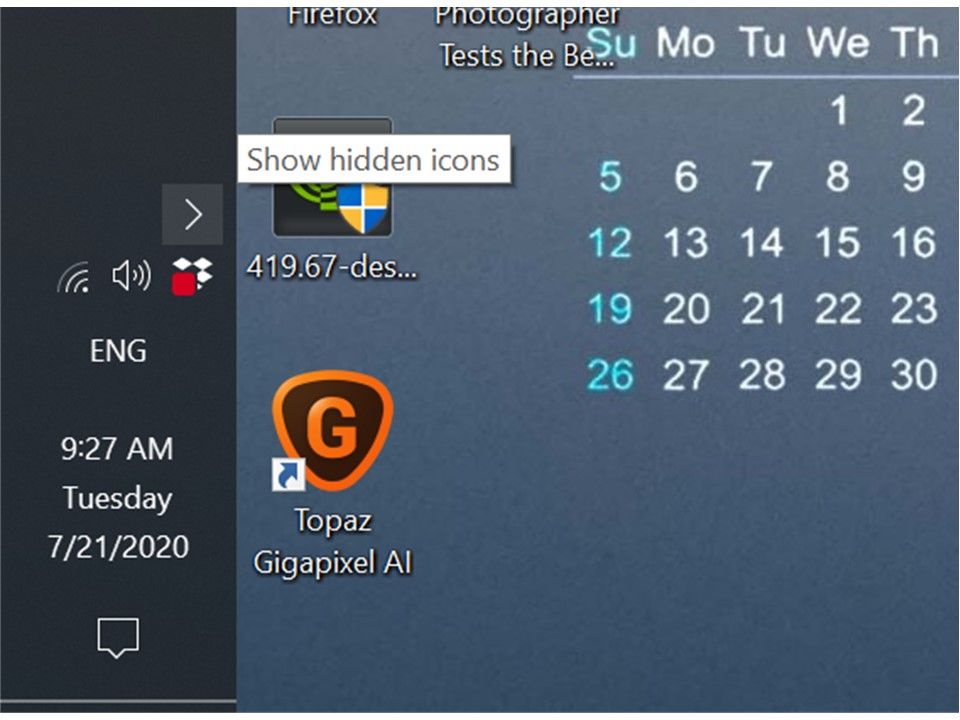
Hello --- it looks like there is a number one (1) in a red dot on the dropbox icon in the system tray -- what is this and what does it mean? Thanks
It could be a notification. Click the Dropobx icon > Go to Notifications tab > Mark it as read.
hello --- that for the info --- I thought that was the case, but why would the indicator just appear on only one of my computers? --- I have that one turned off now, will check it the next time I start it up ---- Thanks again
I see a red indicator and my clicks on the icon don't work. Tried restarting as well. So I have no idea how to check notifications when nothing happens when I click on the icon (both clicks don't work)
I have the same problem. Big red box on the icon on my windows desktop. No number, just a red box. "Open dropbox in system tray doesn't work (don't know that it ever has) and I don't see anyway to figure out this is and if it's something I care about. Files seem to be syncing, but it's not like I've gone through every single file to see if it is there. HELP!!
Uninstalling and re-installing dropbox worked for me. Unfortunately, this is not a good solution.
Having a free account with dropbox does not work anymore, you get zero support, unfortunately. I wish they had a affordable 100 GB plan.
In first of all sorry for my english and excuse me for a possible mistake. I'll write then also in italian, my language, hoping someone of you can understand me.
From about 5/7 days the dropbox icon appears with a little red "1". The "1" is over the icon. I'd look for, thinking it would be an error, something notice into my remote dropbox or in the dropbox website without find anything . What's is? Someone of you can help me? Thanks for the attention.
Da qualche giorno l'icona di dropobox appare con un "1" rosso. Ho cercato sia in locale che in remoto qualche notifica e/o indicazione senza trovare nulla. Qualcuno sa dirmi cosa è? Grazie per l'attenzione,
Flavio
@FlavioTorelli wrote:My desktop app shows a red 1 on its icon. What is this?
You have a notification. Single-click the icon to open the Dropbox window, then go to the Notifications tab.
Hey peeps, just jumping in here!
Would you mind sending me a screenshot of the icon that you're referring to @cindy t.3?
Also, can you clarify what you're referring to when you say that the Dropbox icon in the system tray doesn't work? Does nothing open or do you not see the relevant info that you're looking for?
If you get this icon again @sandeeppatil, please do let me know and we can have a look into this further to see what we can do without needing to reinstall the desktop app.
Keep me posted!
@Daphne
First slide is the red dot/box I'm seeing.
Second slide shows the open menu. The Open Dropbox in system tray" open nothing.
View Sync issues tells me there are no issues. I'm not getting any error notices.
As far as I can tell, everything is working fine. Dropbox is showing that files are synced and I haven't found any missing ones, not that I've checked every file in every folder. But having had an experience with Carbonite where it showed my files as backed up when they weren't (which resulted in losing 5T of data), I don't really trust little green checkmarks.
I do have a ticket created for this now as well.
Thanks for getting back to me here @cindy t.3!
It looks like you're Ctrl+clicking the Dropbox icon, can you try left clicking the Dropbox icon and let me know if that brings up the correct window where you'll see your notifications etc?
Cheers!
@Daphne I control click because that is the only way to get anything to open. Left clicking does NOTHING. That's an old, old problem that I quit caring about because I could get to everything I need with a control left click
I see, thanks for clarifying that @cindy t.3.
Since you mentioned reaching out to our Support team for this, can you let me know the ticket number (eg. #1234567)?
Also, which version of the app do you have installed at the moment?
support id 11077996
Dropbox v101.4.434
It's probably an old version, but at one point several years ago Dropbox made a bunch of changes (to turn it into an app) that made it completely non-functional for what I needed on my system. It was weeks of trying to figure out a solution, with the end result being going back and tricking my computers into loading an old version that wasn't an app. I don't have time to go through hat again.
@Daphne And, as usual, support has been useless thus far.
Since you're already in contact with the team, it would be best to continue there @cindy t.3 as they can look into this with you alongside some device specific info.
It looks like it would be a notification icon, however we would only be able to tell that from the window that should open when clicking the Dropbox icon (not the one you see when Ctrl+clicking).
Since you're not able to access this menu, I would suggest reinstalling the desktop app as it could be an underlying issue with you current installation due to the steps that you took previously when installing.
Also, just as a side note, you can disable the new Dropbox app interface and continue to just use it through the File Explorer with the steps listed here.
Thanks!
I had to click on the Dropbox icon in the tray, go to the Notifications tab, and even though the messages were marked as read I clicked on the More icon on the right side (3 dots) of each notification and dismissed each notification. That finally solved the problem for me to get rid of the red 1 to disappear from the Dropbox icon.
Hey @mh1106, thanks for letting us know what did the trick for you - awesome work with the troubleshooting!
If you have any other questions or thoughts for us in the future, don't hesitate to give us another nudge.
In the meantime, I hope you have a lovely day ahead!
Dang, I thought that might take care of it, but no. The red dot is still there.
Hey, I'm having the same issue here. Upgraded to the new app (now running 104.4.175) and my system tray icon has the red square with no number on it (https://imgur.com/3k0hzX4 ), and the tray icon does not respond at all to single right-click or single left-click. If I double-click it opens the app.
I'm having the same issue as @cindy t.3, system tray icon has a red dot on the lower left side with no number in the dot. The only way I can open the App is ctrl-left mouse click, double click just opens the local Dropbox folder. I have reinstalled twice now, once with the advanced reinstall instructions from https://help.dropbox.com/installs-integrations/desktop/advanced-reinstall. I could open a ticket, but it would be the same as the one already open by @cindy t.3. I'll just keep limping along for now with the ctrl-left mouse click workaround. One good note is that all the files/folders are syncing. I'm running v104.4.175 on Windows 10. My account is Dropbox Business Standard with 5 TB of storage.