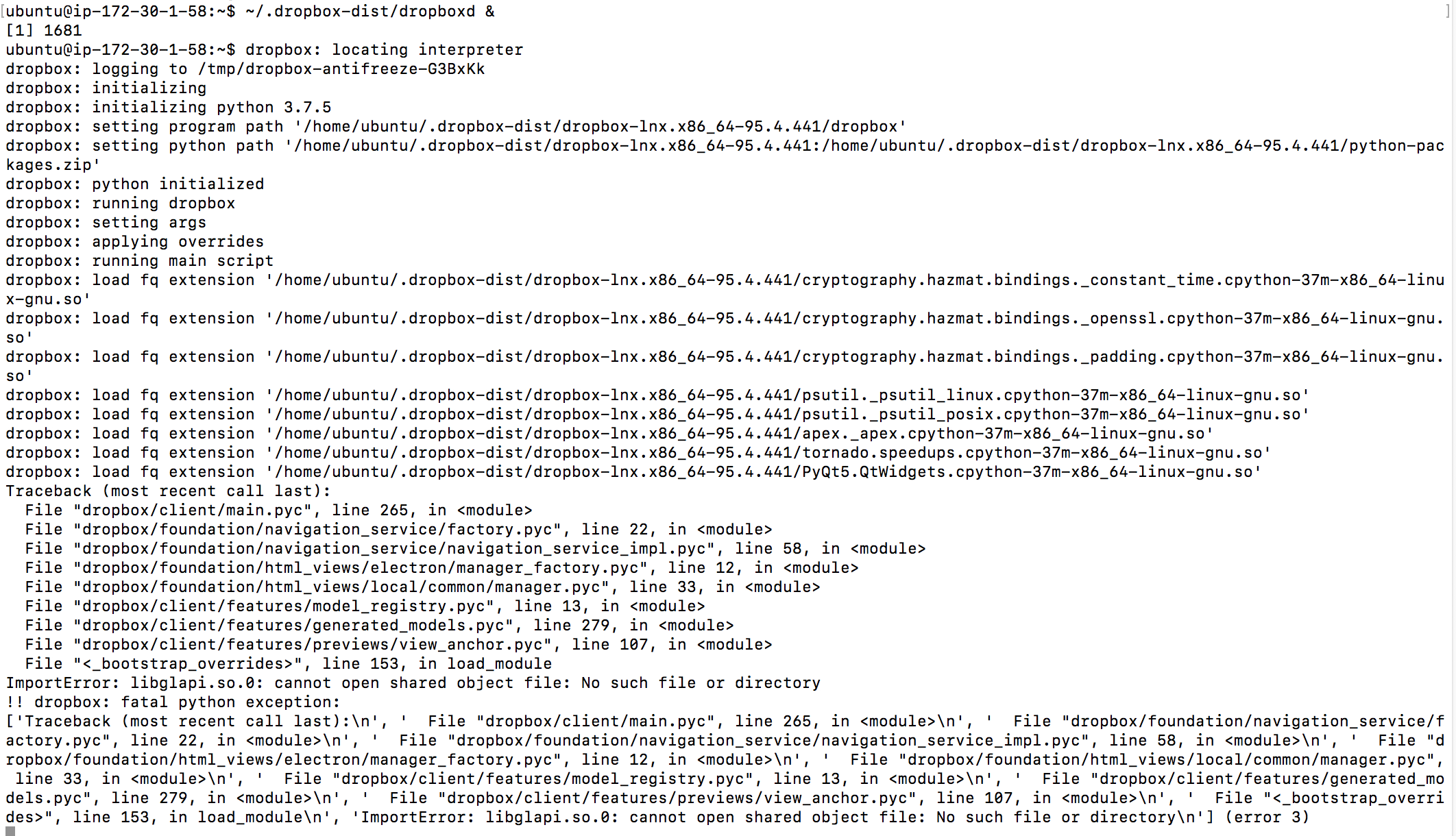
As of today Dropbox is permanently stuck on "upgrading Dropbox". I'm running Dropbox in Linux. I've found references to such error messages a good while back by Googling, but no simple fix.
Huh? That was not solved. Asking for a screenshot is not solving this problem!
No worries, @ngtr. Let me know of any updates and I’ll make sure to get back to you as soon as possible. :upside_down:
So I figured this out: Dropbox seems to check for a new version and if one is available, then fails to upgrade to it.
From then on, it keeps saying "upgrading Dropbox" constantly. This never gets better, unless I upgrade it by hand. Is there way to fix this or prevent it from trying to upgrade?
It is very annoying, as it constantly makes it look like Dropbox is still syncing. I also don't see any files that are being synced, as the "dropbox upgrading message overlays any other messages.
This has been true for any Dropbox version going back about 1 year from the date of this post. It would be more professional of you if you could make Dropbox log error messages, this makes a problem like this solvable.
This is on Debian Stable (Stretch) Linux.
Your instructions for headless upgrade says this:
cd ~ && wget -O - "https://www.dropbox.com/download?plat=lnx.x86_64" | tar xzf -~/.dropbox-dist/dropboxd
This works, EXCEPT that the second command does not work, because it says that another instance of dropbox is still running. So doing:
cd ~ && wget -O - "https://www.dropbox.com/download?plat=lnx.x86_64" | tar xzf -
dropbox stop
~/.dropbox-dist/dropboxd &
works.
Maybe you want to update your instructions accordingly.
As someone else in this thread noted, a request for further information is labelled - wrongly, obviously - as a solution.
Now, user ngtr was good enough to actually provide a solution, but (1) it is manual whereas the application should do this for the user, (2) it is not permanent. To expand on drawback 2: every time Dropbox tries to upgrade itself, I must reapply the fix. Moreover, when Dropbox is going through its regular and doomed struggle to upgrade itself, it uses some resources and indeed in such a way as to slow down my system, especially Firefox. All of this is pretty disastrous. So, Lusil, please ask the developers for an actual fix. Thank you.
Thank you for this solution. I appreciate it. However, it is only partial - as my post further down explains.
I was in the same situation as the others here on the current opensuse level. I tried to adapt ngtr's solution without really understanding it and got into a situation where dropbox was trying to reinstall - and then hanging on 98% - on every new session.
Running "dropbox start" from the command line showed that something was looking for "libatomic.so.1" so I installed the newest libatomic package (not the gcc7 one, that would have been next) and now everything appears to work again.
Ugly. Very ugly.
I had same issue on Fedora 31, to fix that install libatomic:
sudo dnf install libatomic
Thanks for the libatomic advice. I'm also on Fedora 31 and can confirm installing libatomic and restarting dropbox fixed the issue for me as well.
yup, worked for me too on fedora 26
On Ubuntu 18.04 running:
apt-get install libatomic-ops-dev
solved the problem.
I thought libatomic-ops-dev was gcc7 based, the libatomic1 I installed is based on gcc8. There was no research on my part when I installed it, it was a case of "see if this works". It did.
I don't know how anyone else approached this but I entered "dropbox start" in a console-window and the error message made it clear what was missing.
@DinsdaleFor me libatomic-ops-dev worked (no error in console), however after your post I tried libatomic1 and it worked, too.
A big - and strange - new development.
I have a second machine which also uses Dropbox and which was also exhibiting the same symptoms. So I installed libatomic1 there, logged out and logged in again. Dropbox then announced that it was "Up to date".
Strange is: I had reinstalled Dropbox on my first machine and now have 85.4.155 there. This second machine claims to have 84.4.170 but is "Up to date".
This is still ocurring, i.e. Linux update is failing and stalling the Dropbox service.
$ ./dropbox.py status
Upgrading Dropbox...
If you have downloaded the above python "dropbox.py" script from the Dropbox Linux page, you can do the following to at least get the Dropbox service running again:
$ ./dropbox.py stop
Dropbox daemon stopped.
$ ./dropbox.py start
Starting Dropbox...dropbox: locating interpreter
...
Regards,
Daniel.
As an update, the latest version of Dropbox for Linux (94.4.384) seems to require a whole bunch of libraries that seem UI related, which is odd for a headless clients. These can be installed using the following (on APT based systems):
apt install libglapi-mesa libxdamage-dev libxcb-glx0 libxcb-dri2-0 libxcb-dri3-0 libxcb-present-dev libxshmfence-dev libxxf86vm-dev
You may also need libatomic:
apt install libatomic1
Then do:
./dropbox.py stop
./dropbox.py update
Check the output, if there are any complaints about missing libraries, do a Google search similar to "<your linux distro> how to install <library name>"
I'm having this problem now. And none of the solutions I've tried, including the ones outlined here, have worked.
All my Linux servers that run Dropbox are now trying to upgrade themselves and apparently failing. Nothing is syncing.
I'm getting a jumble of errors -- I have no idea what they mean -- and I don't want to know. Here's what it looks like.
Davewiner: what Ubuntu version are you using? Also is it server (with UI) or desktop?
Ubuntu 18.04.3 (LTS) x64 -- five of the servers are on Digital Ocean, one is on EC2/AWS.
They're all headless servers.
The listings are impossible to read. That's exactly how they appear on my screen.
I just use Dropbox, I don't want to know anything about its internals. It's kind of appalling that they do this, auto-upgrade, and that's broken? That's the one thing you can't break. You can see from a Google search that this has been going on for YEARS.
Do any of you consider switching to something that's more stable? I know that I am. The last couple of years I've had a lot of problems with Dropbox. I've been using it since the beginning.
Davewiner:
what output do you get when you do?:
sudo apt install libglapi-mesa
I don't know what that is and why I need to update it.
It looks like an OS component??
I did a search, but there isn't much in the way of docs.
I went back and looked at the earlier message. I'll try it now.
It seemed to work, and then I did a "dropbox stop" and a "dropbox start" and it did it cleanly, no Upgrading Dropbox message on status.
Then it says "up to date" for status. But something's still not right, I'm investigating.
Thanks for the tip that seemed to get me out of the limbo I was in.
Did you do the:
If you just do the stop and start, Dropbox will at least sync, but at some point in the near future it will try to do the update again, and if you haven't installed all the missing dependencies as described above, the update will fail again.
Please review my original post from 3 weeks ago where I give the full list of libraries that need to be installed.
Have you installed all of those along with libatomic1?
Please note that, unless you have changed the configuration of 'apt', anything you install using 'apt' is from the official Ubuntu packages.
Cheers,