Hi everyone,
I’m experiencing an issue with Dropbox desktop syncing and would really appreciate your help.
I have a Dropbox Plus account. When I upload files through the web interface, everything works normally. The uploaded files are also visible on my other devices.
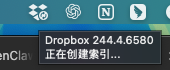
However, on my two Mac laptops, when I add files into the local Dropbox folder, the app gets stuck on "indexing" and does not proceed to upload or sync the files.
Here is the situation:
- Web uploads: working normally
- Other devices: syncing correctly
- Local Dropbox folders (2 laptops): stuck on indexing, no upload occurs
I am currently located in China and using a proxy/SSH tunnel (SOCKS5 via 127.0.0.1:7070). I suspect this might be related to network or connectivity issues affecting the desktop app.
I have already tried:
- Restarting Dropbox
- Reinstalling Dropbox
- Changing network / proxy settings
But the issue still persists.
Has anyone experienced this before or knows how to fix it?
Thanks in advance!
Device:
MacBook (2 devices)
Operating System:
macOS (latest version)
Dropbox App Version:
Latest version (auto-updated)
Syncing Status:
Stuck on "Indexing" (creating index), no upload progress