Application Affected
Dropbox Desktop
Device
Thinkpad E15
Operating System/Browser (if using the web)
Windows 11
Dropbox App Version (if using the app)
241.4.4853
Question or Issue
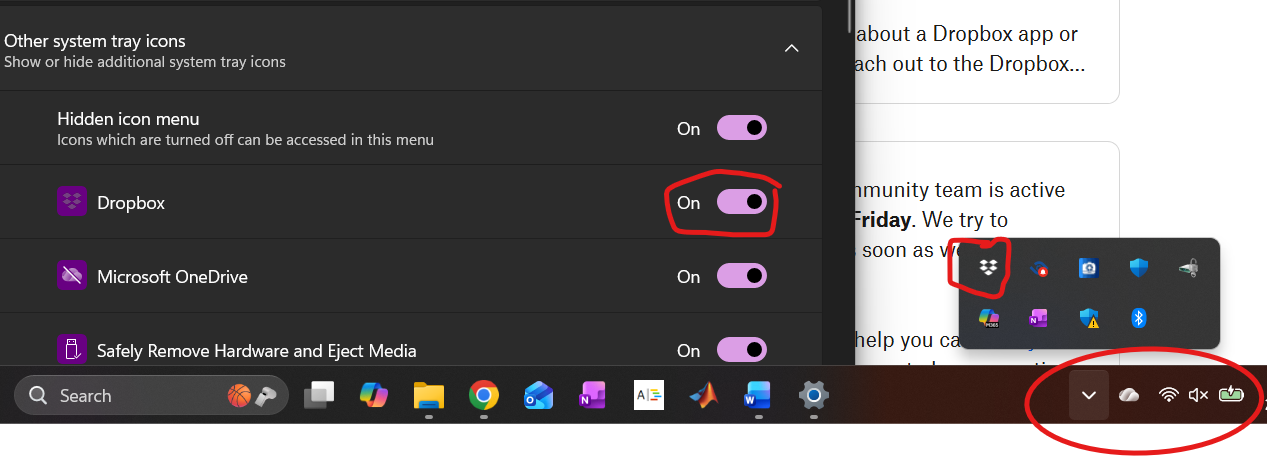
I am running the latest version of Dropbox Desktop on Windows 11 (25H2 version, build 26200.7840). I set the system tray manager to show the Dropbox icon, and everything worked as expected. With the most recent Windows update to 25H2, the icon no longer shows, although the program is running and can be accessed by clicking the "expand hidden icon" buttons. You can see from the screenshot below that the Dropbox is set to display in the Windows -> Settings -> Taskbar -> Other System Tray Icons menu, yet is not shown in the (circled) home icon area, although it can be accessed by expanding hidden icons. Doing the obvious things have not helped (shutting down Dropbox and restarting it, rebooting, turning off the "Show Dropbox on System Tray" option, rebooting, then turning the option back on). Anything I can do short of uninstalling the entire desktop program, rebooting, and then reinstalling it from scratch?