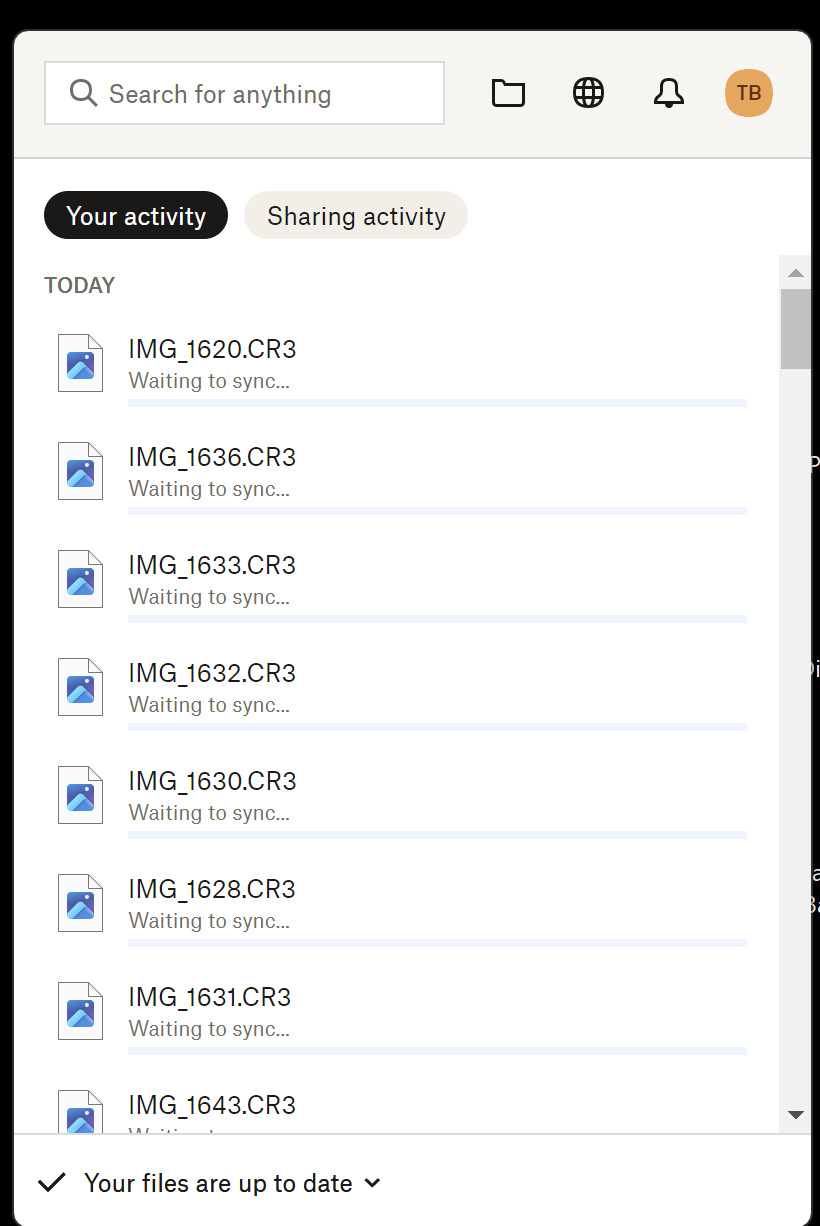
As the attached screenshot shows, when I look in the Dropbox manager in the Windows taskbar it simultaneously tells me that “Your files are up to date” while also listing all the files still “Waiting to sync.” This is not a one-off, it happens every time I transfer photos from my camera into my Dropbox folder. I would like to know when the syncing has actually finished. Which of these messages is accurate?
I did ask customer support about this in chat before posting here and all three people I talked to couldn’t answer this question. The first one said that the problem was the file names and told me to remove the “dots” from the file names. (Even if this issue was related to file names, the only periods in the file were before the suffix; ie .cr3) The second person’s English was not good enough to actually understand my question and also told me that they could not help unless I sent a screenshot showing my entire computer screen, rather than the cropped picture you see here. The third just didn’t know the answer. So, if anyone from Dropbox is reading this, you have a serious customer support problem and ought to overhaul your hiring procedures.