Hi,
There's a fairly well-known issue on MacOS where the finder extensions don't show up on right-click. It's a major problem because on older Macs if you can't quickly bring a file to the local drive then many applications won't be able to open it, or even recognise the file at all. Sometimes it can be fixed through reinstalls and checking Finder settings.
I have a new variant on this, whereby I can see some Dropbox finder extensions in the non-Dropbox folders of my drives, but NOT in the Dropbox folder where I most need them!
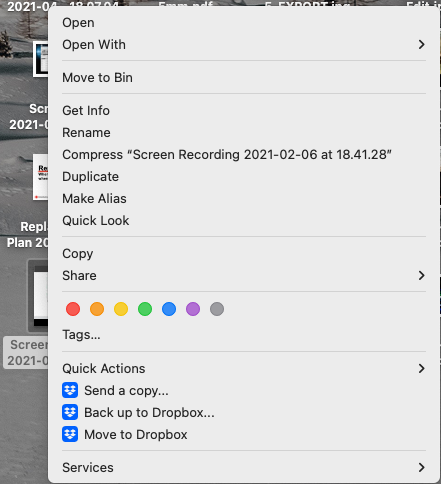
This is what I see on my desktop (non-Dropbox files):
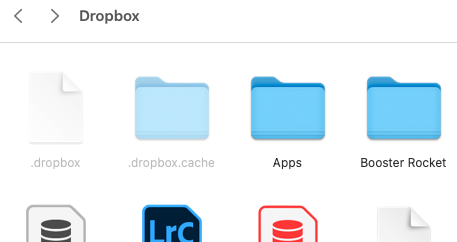
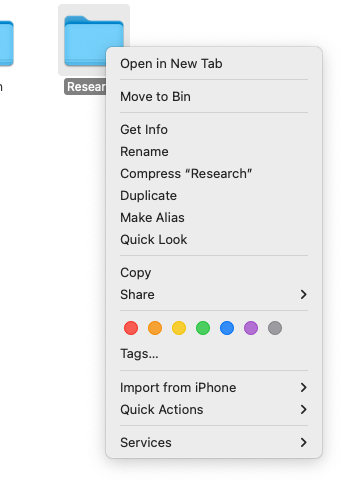
But this is what I see in my actual Dropbox folder and child-folders:
It should look like this:
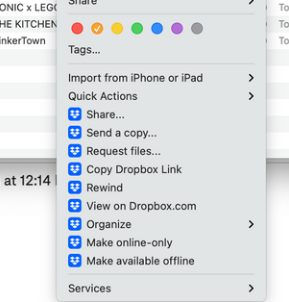
"Make available offline" is vital for me, any ideas how I can get it back?
FYI I'm on Monterey 12.7.1, Intel chip and running the latest copy of Dropbox on a clean install. All my finder extention checkboxes are checked. The reset and clean install haven't fixed anything, but I don't know whether the context menu was showing up outside of Dropbox before that - I wasn't looking for it there.
Thanks in advance!