Hi there,
MacBook Pro mid-2015/retina model, running Monterey 12.6.2. I am having a really frustrating but somewhat intermittent issue with the (disastrous, by all accounts) recent macOS update/changes.
Context - I work with a lot of PDF files, creating/exporting a lot and storing almost everything on Dropbox (for now, though I am seriously considering ending my contract and looking elsewhere). I am often commuting so working on the train with unreliable WiFi or hotspots.
If I move a PDF file into my Dropbox folder while the connection is offline or unstable, I lose access to the file completely and it cannot be opened - even though it is a local file, created on this very machine. This has only been a problem since the recent CloudStorage changes. I just want Dropbox to work how it used to - as a folder on my machine that I could use like any other local folder, which then updates/syncs when connected but never stopping me from accessing my own local files.
Currently, when I put a PDF in Dropbox with an unstable connection, I lose access to it immediately until online. This cannot possibly be working as intended, right? Am I going crazy?
Take as an example this file that originated in my Downloads folder on the system. I just moved it into Dropbox and am currently connected via mobile hotspot so connection is a little patchy but I do have internet (obviously). The file appears like so:
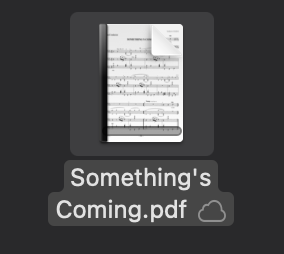
With a cloud icon and an empty progress bar on the icon. I was perfectly able to open this file 30 seconds ago, while it was in Downloads, before moving it into Dropbox.
Now, if I open it, or even just try to move or delete it, I get some kind of error, normally this:
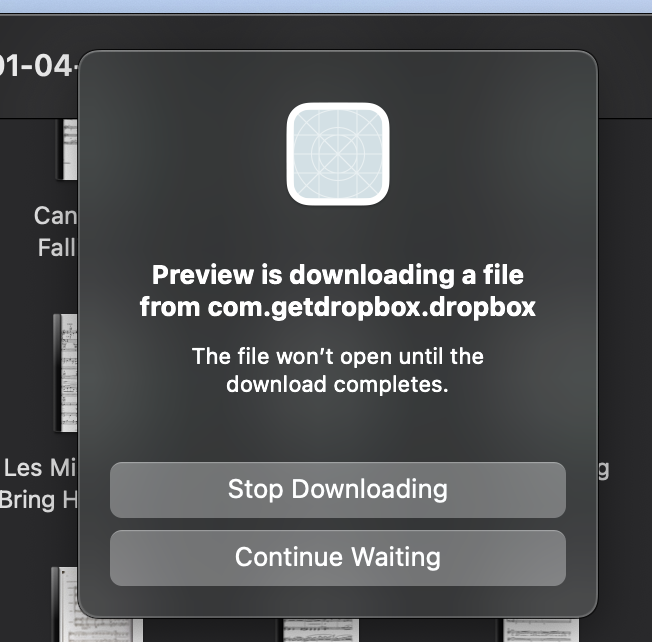
Or sometimes just a generic "The operation was cancelled" dialogue box. I am completely locked out of my own file.
Normally after the internet connection stabilises or my system restarts, Dropbox completes syncing and I can open the file. But this is not satisfactory for me, as I am often working within Dropbox to open, create and edit PDF files, even without an internet connection.
Is this behaving as expected? If so, I cannot continue using Dropbox as I am losing hours of work by not being able to open my own files until they are... uploaded..? It makes no sense to me! Any fixes would be welcome but this is quite hard to replicate

