I have recently updated Dropbox to the latest version (v172.4.7555) whereby the location of my Dropbox folder has moved to the 'CloudStorage' folder within Library on Mac OS (Ventura 13.3.1).
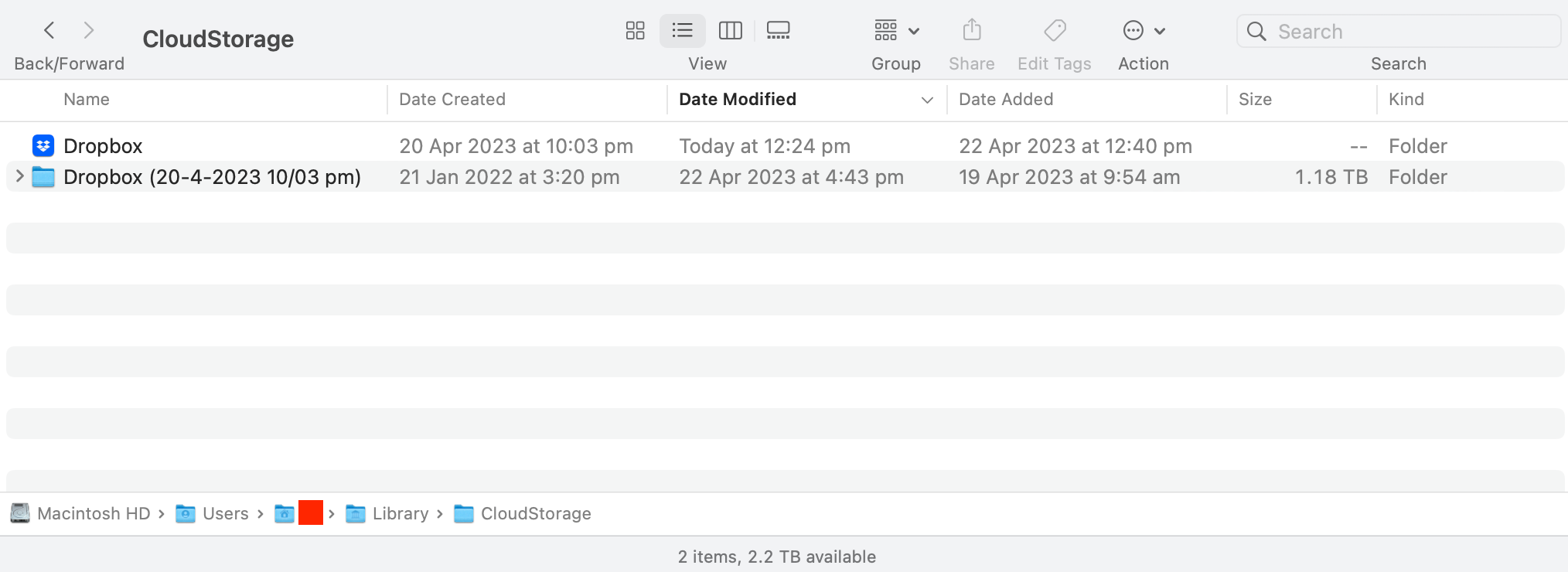
For some reason there are now two Dropbox folders within the CloudStorage folder. One of the folders has the blue dropbox icon and is just named 'Dropbox', and the other looks like a normal system folder and has been named 'Dropbox (20-4-2023 10/03 pm)'. See screenshot below.
The latter of the two (the normal system folder) appears to be a copy of the Dropbox folder with same contents as at the time of the update/migration to the CloudStorage folder. They are no longer exactly the same due to changes since the migration. Dropbox appears to be working fine and is syncing from the first folder with the blue icon.
Perhaps the copy folder was created as a backup during the migration I am not sure? I would like to delete this second duplicate folder as it takes up a lot of storage space, however want to make sure my files won't be affected. It would also be good to know I haven't lost any files during the migration.
One issue that makes me nervous is that the Music app on my MacBook Pro is linked to and playing files from the second duplicate Dropbox folder, not the Dropbox folder with the blue icon. These same music files are in the blue Dropbox folder and it should be linking to them, not the duplicate folder. This makes me worry what else might be linking to the duplicate folder that would be affected if I delete it.
If anyone can provide info on why this duplicate folder was created, can confirm I can delete it safely, and can also confirm how I can check I didn't lose any files during the migration, it would be much appreciated.
Many thanks.