I can't seem to find an answer to this issue specifically. I have a folder within a folder that contains many files I do not want added to my dropbox. Attempting to use selective-sync, I went into my Dropbox preferences on my Macbook and deselected the folder from syncing, however, when I clicked update, it get deleted the folder from my desktop and is only available on dropbox.com. I would like to keep the files on my desktop, but not have them added to my dropbox.
I tried using this article (https://help.dropbox.com/sync/ignored-files) to use terminal to specifically exclude this folder from syncing, however, I cannot seem to get the code correct and keep receiving error messages in terminal. I am not quite sure where here:
xattr -w com.dropbox.ignored 1 /Users/yourname/Dropbox\ \(Personal\)/YourFileName.pdf
Where I am supposed to begin adding my file path, etc?
Previous to this, I would 'right-click' on a folder and use the dropdown menu to exclude it from sync-ing to dropbox. However, that seems to not be available now?
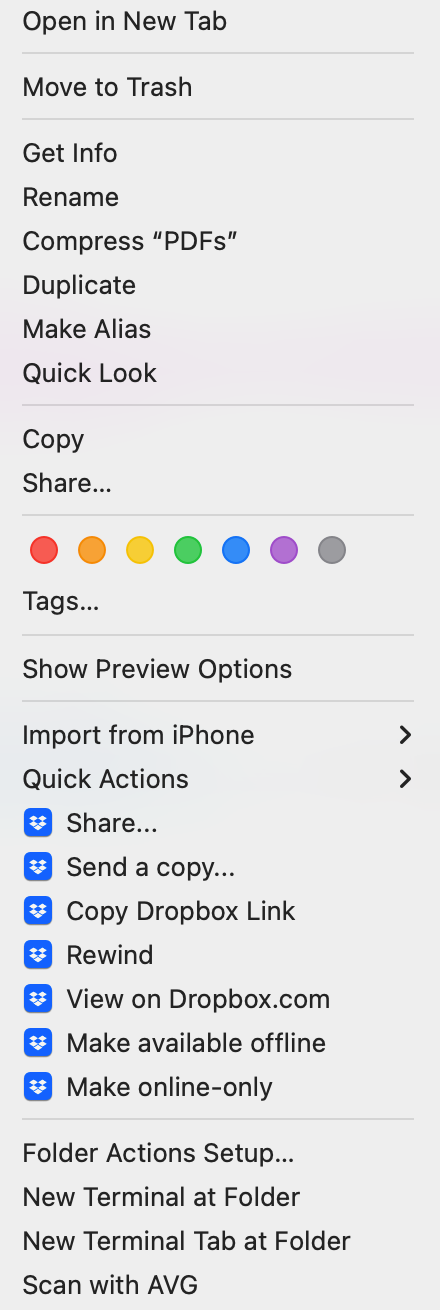
I have also gone on dropbox.com to attempt to see if I can find away to exclude this folder, but I cannot. Is there any way I can keep this folder where it is, exclude it from Dropbox, and have it remain on my computer?
[MacOS: 13.2.1 (22D68)]




