Hello, when I started my 3 TB DropBox business trial last month I was under the impression I would be able to back up all my photos (over 1 TB) from my iMac desktop computer (not from my iPhone, which only holds a fraction of my photos). I have searched endlessly, please help.
System:
iMac desktop/OS Mojave 10.14.6.
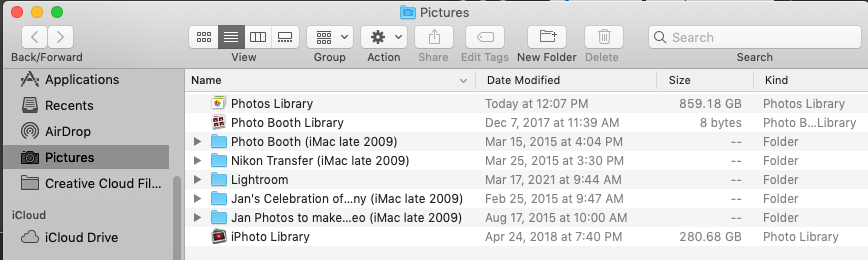
My photos library is located:
Macintosh HD > users > home (my name) > Pictures (folder) > Photos Library.
I also have other folders of photos that are not in Mac photos in there. See snapshot below:
What I am doing:
I am going to DropBox on the top bar of my computer > to my icon > preferences > backups > manage backup.
Photos/Pictures is not a folder option. The only options are: Desktop, Documents, Downloads, Music, and Movies.
I also tried going to my icon > preferences > sync > choose folders, and I get the same options I just mentioned above.
I appreciate any and all assistance.
Thank you kindly.
LTDTM



