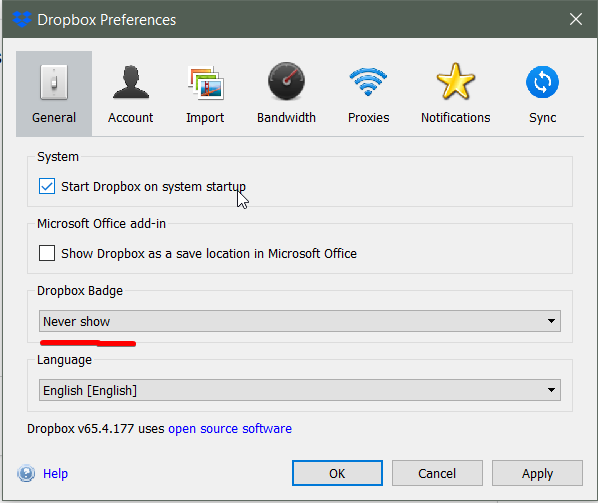
How to remove dropbox icon from taskbar without closing app? In prefernces I have choosen Dropbox icon>never show, yet it is there.
Oh, that's the Dropbox Badge - not the icon from your task bar @DeerUser69!
If you want to disable the Badge take a look below:
https://help.dropbox.com/installs/badge-on-off
If you'd like to completely hide the Dropbox icon from your taskbar you can disable the automatic start-up but then again you won't be syncing your files so I'd be cautious here.
I hope this clears things up a tad.
I'm afraid what you're looking for is completely uninstalling the desktop app as the icon on your taskbar is a crucial part of its functionality.
Let me know if I'm missing something obvious @DeerUser69!
It is weird, why exists such a preference, but it doesn't work? Makes me a bit dissapointed
Could you please send me a screenshot of what exactly you're referring to @DeerUser69?
Ok, I understood this, thank you.
Glad I could help - have a great rest of your weekend!
hi
why icon is important for the app working and updating in background. For me the icon is kind anoying, should has a option to keep app working without the icon in taskbar... updating the folder with a service in background
thank you
The Dropbox icon in the system tray or menu bar shows the overall status of Dropbox; Icons on individual files or folders show the status of that file or folder [link removed as per Community Guidelines].
Hey there @toddynho,
If you don't want to have the Dropbox icon appear in your dock you can disable it from appearing when Dropbox starts with these steps:
If the icon is currently in your dock, you can Command+click the icon and choose to "Quit". Closing this won't prevent syncing occurring in the background, and you should still see the small Dropbox icon in your menu bar.
I hope this helps - thanks!
Hi! First of all, thank you the answer
that's not a solution to the "problem" a mentioned earlier.. you are saying to me to "CLOSE THE APP" that will stop the syncronize. Instead hide the icon at systray. you guys should try to implement into explorer folder the real status of files. Like a progress bar for each file or a statusbar for the "dropbox folder"... keep as a windows service and a folder updating in background.
like i said, i don't want the icon, but i want the folder be update with the dropbox service.
Have a nice day
Hey @toddynho,
Apologies for the misunderstanding there as I believed you were referring to the icon appearing in the dock and not the small Dropbox icon near the system tray's clock display.
With the steps mentioned above it wouldn't stop syncing, however this doesn't apply to what you're referring to in this case. I'll be happy to pass along your comments for review to the team regarding having the option for this to not show.
Thanks!
You mean like every single other piece of useful software?