Currently beta-testing dropbox paper.
The application integrated some of nice features from Hackpad (e.g. insert table), but still lacked insert link function. Will this be added in the future?
Pdf export is also desired.
Hi all
I'm happy to inform you that you can now export Dropbox Paper docs into PDFs!
You can read more about it here: https://www.dropbox.com/help/paper/export-docs
Hi!
You should already be able to insert your Dropbox files via a link into Paper. You can do so in one of two ways:
https://www.dropbox.com/help/9167
For PDFs, we don't have this feature right now but I can offer you a solution. If you use the print function in the paper menu, you can then use the preview to save the page as a PDF
Thanks.
Please consider adding a full PDF export as soon as possible. It is crucial in order to use Dropbox paper for scientific work. Also, Markdown export currently seems to hang (at the download popup).
Markdown export also hangs for me.
And docx export as well.
The only thing I can do is print to PDF...
Hey @FP0108,
You can post your request about Paper here regarding the PDF export functionality. The more upvotes the better! I will also pass this on to our Paper development team.
Regarding the Insert Link feature, could you please give us some more info regarding how you would want this to work?Thanks for using paper!
Would you mind taking a minute of your time to fill out a survey sharing your experience using our Dropbox Community? You can <a href="http://bit.ly/2lNKIxT>access the survey here</a> Thank you![This thread is now closed. If you have a similar or new question, you can ask here]
Hi Kaz!
I have tried to print the Paper doc to get a PDF file from it but it only prints the first page. How can I get a print of the whole document? Thanks.
I have seen this in firefox, too. Worked fine when I did it on Safari instead, though the margins were still disgusting and with seemingly no way to fix it to look even half decent on paper. Relying on the (******) browser for formatting is one of the reasons why PDF export is so urgently needed.
I love using paper for editing, but if I can't show my boss the results then it's not going to be useful for very long.
(btw - exporting to docx is useless when you have equations).
Is there any update on native PDF export for Dropbox paper?I know that its possible to print -> save as PDF, but this produces a poorly formated document that doesn't look half as good as the original online Paper document. This would make Paper a killer app, in my opinion. I'm quite honestly surprised that a plugin/exporter doesn't already exist.
Hi,
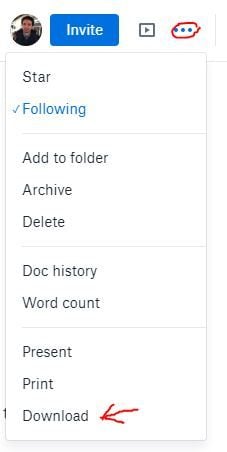
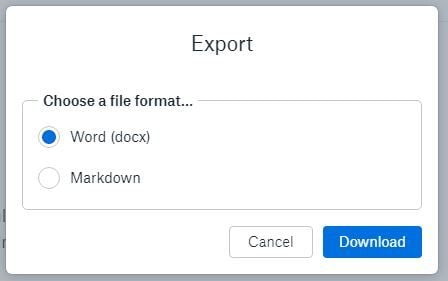
You can download/export your paper documents as MS Word document by clicking on "three dots" on top right. It will open additional settings menu. From that menu choose Download and then pick Word (docx).
MS Word supports saving your file as PDF along with other file formats. Here is couple screens if you need additional help.
Yes, this is very nessesary for my company as for right now there is no way to export the paper docs with the captions I added to the pictures! So screenshotting through chrome dev tools is the only way I can capture those captions, because the pdf —> print function very poorly exports any table I might have in the document... very annoying!
A current workaround is to export to Markup and then use an online Markup -> PDF converter tool.
However, I too would very much like a PDF export option. The whole point of Dropbox paper is, for me, to not have to use MS Word in the first place...
I hope this function is implemented.
If I export docx file, it's too different from what's on the web editor especially on the mac.
Hey All - thank you for using ( and help improve) Paper!
This sounds like a great idea - having the ability to export Paper docs as PDF files would indeed be very helpful. Thanks for your feedback about this - I am passing your thoughts and ideas along to the Paper team for consideration!
If you have any other ideas or suggestions, please let me know. Thank you!
I downloaded the Dropbox Paper app. I wanted to export a document, but when I click the elipisis the option to export does not appear. Am I doing something wrong?