hi mike,
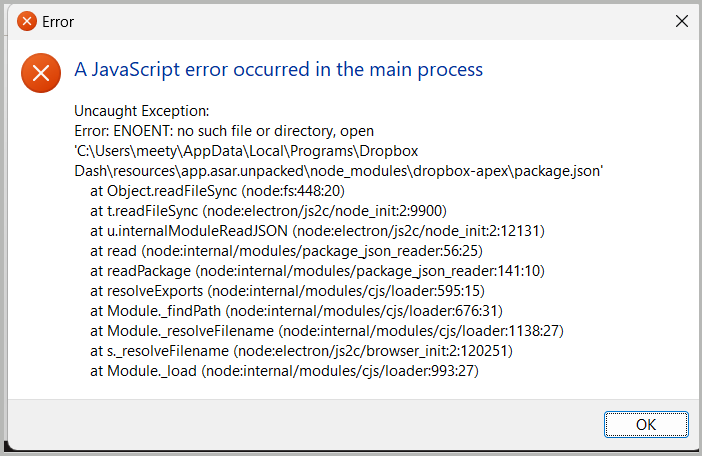
I encountered similar startup error message after uninstalling dropbox dash (as printscreen). kindly advise if there's a fix, thanks 🙂
Hi @liyi,
It's possible that there's a background process still running. Since you've disabled Dash as a startup app, try restarting and attempting the deletion again.
Alternatively, you can open Task Manager and look for a Dropbox Dash process running that you can end, then attempt the deletion again.
If this doesn't work, let us know and we can reach out via email to take a deeper look.
Thanks,
Ben
Hi @liyi, thanks for bringing this to our attention.
I've moved your post to another thread as it was unrelated to Dropbox Capture.
What is the exact version of Windows that you're running?
Could you let me know the steps you're taking in order to get this error message?
This will help me to assist further!
thanks Jay!
i'm on windows 11 pro (version 23h2).
dash was downloaded and installed from official site last week, and uninstalled via the Control Panel\Programs\Programs and Features.
this error window pops up in every startup later on.
please let me know if you need more info. thanks!
Thanks for the information. Could you try the following to resolve this behavior?
To finish removing Dash, if you click on the Open Folder button next to the toggle (from the above instructions), it will take you to the install location:
Let me know how it goes!
I found Dropbox Dash in the Startup Apps list and turned it OFF.
But i cannot finish removing Dash, following these steps:
"if you click on the Open Folder button next to the toggle (from the above instructions), it will take you to the install location:
it says that the file is in use but i've already uninstalled it:
please advice further, thanks!
thanks ben and jay!