Im trying out the V2 ApI and I am having some issues to list all the folders and their content.
So i managed to curl via terminal using this :
curl -X POST https://api.dropboxapi.com/2/files/list_folder
	--header "Authorization: Bearer <acces token>”
     	--header "Content-Type: application/json"
	--data "{\"path\": \"\"}"
And it succeeds, it returns:
{ "entries" : [
{ ".tag" : "folder", "name" : "hotel_1", "path_lower" : "/hotel_1", "path_display" : "/hotel_1", "id" : "id:QmI2D_9l9AAAAAAAAAAACA" },
{ ".tag" : "folder", "name" : "hotel_2", "path_lower" : "/hotel_2", "path_display" : "/hotel_2", "id" : "id:QmI2D_9l9AAAAAAAAAAACg" },
{ ".tag" : "file", "name" : "text1.txt", "path_lower" : "/text1.txt", "path_display" : "/text1.txt", "id" : "id:QmI2D_9l9AAAAAAAAAAADg", "client_modified" : "2017-12-08T11:24:37Z", "server_modified" : "2017-12-08T11:24:40Z", "rev" : "7707ce270", "size" : 7, "content_hash" : "<content code>" } ],
"cursor" : "<cursor code>",
"has_more" : false }This is my folder structure:
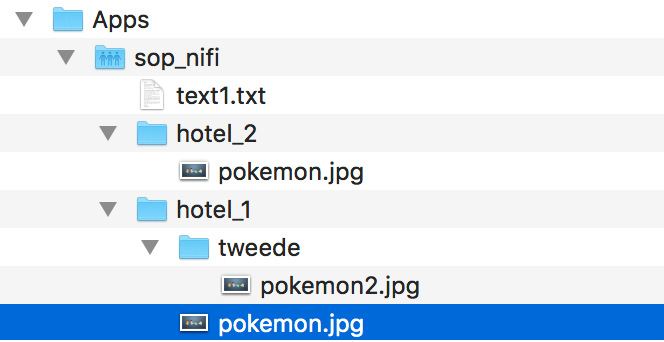
So i know i have to adjust the "path" and set "recursive" to true, but whenever i do that, curl does not return anything, not even an error. Or with some tries i got back "could not decode input as json".
so some of the paths i tried are:
--data "{\"path\": \”/hotel_1\”}”
--data "\"path\": \"/sop_nifi"}"

--data "\"path\": \"/sop_nifi"\"/recursive:true\"}"
and other variations i cant remember. I read the documentation but just do not seem to grasp the systax for the path variable. Can someone help me out list all the files and folders?

